If you sell products or digital goods across Europe with WooCommerce, managing VAT correctly quickly becomes complicated.
Different countries apply different tax rates, B2B customers expect VAT exemption with a valid VAT number, and checkout validation often becomes a mess — especially when you start selling internationally.
Many WooCommerce stores try to solve this with manual rules, custom snippets, or multiple plugins layered together. The result is usually a fragile checkout experience, inconsistent VAT handling, and compliance risks.
In this guide, we’ll explain how EU VAT works in WooCommerce, the most common mistakes store owners make, and how to simplify international tax handling with automation.
Why EU VAT in WooCommerce Becomes Complicated
WooCommerce supports taxes natively, but real-world European commerce often requires more advanced logic.
Typical scenarios include:
- B2B customers purchasing with a valid VAT ID
- Domestic vs intra-EU taxation
- Reverse charge handling
- OSS (One Stop Shop) compliance
- Different VAT rules for physical and digital products
- Country-specific validation requirements
- Checkout fields that change depending on business type
- VAT exemption visibility issues
- Different invoice requirements per country
As your store grows internationally, these situations become harder to manage manually.
The Difference Between B2C and B2B VAT in Europe
One of the biggest sources of confusion is the distinction between B2C and B2B sales.
B2C Sales
For consumers, VAT is generally charged based on the destination country.
Example:
- An Italian company selling to a French consumer usually applies French VAT rates once OSS thresholds and rules apply.
B2B Sales
For valid intra-EU business transactions, VAT may be exempt under the reverse charge mechanism.
This usually requires:
- A valid EU VAT number
- A company purchase
- Cross-border EU transaction
- Proper invoice wording
Without automation, store owners often validate VAT numbers manually or apply exemptions incorrectly.
Common WooCommerce VAT Problems
Here are some of the most common issues WooCommerce merchants encounter.
1. VAT Numbers Are Not Properly Validated
Many stores simply add a text field for VAT numbers.
But collecting a VAT number is not enough.
You should also:
- Validate format
- Verify country prefix
- Optionally validate through VIES
- Store VAT information in the order
- Display exemption logic dynamically
Without proper validation, businesses may receive tax exemptions incorrectly.
2. Checkout Logic Does Not Adapt to Customer Type
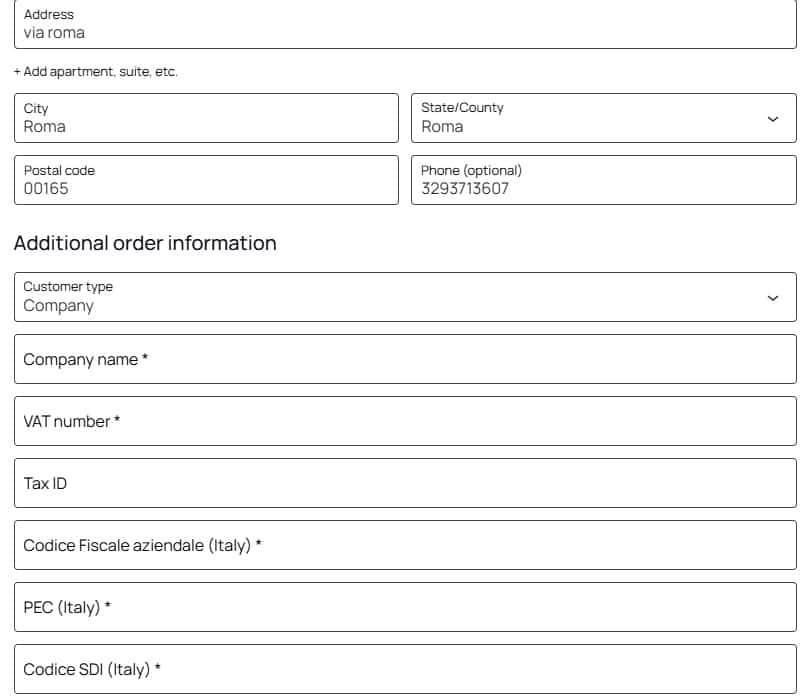
A B2B customer usually needs different checkout fields than a consumer.
For example:
- Company name
- VAT number
- PEC or fiscal identifiers
- Country-specific business information
A static checkout often creates friction and abandoned carts.
3. Reverse Charge Rules Are Applied Incorrectly
One of the most common mistakes is removing VAT for all customers with a VAT number.
This is incorrect.
VAT exemption depends on:
- Customer country
- Store country
- EU membership
- VAT validity
- Product type
- Business status
Improper configuration can create accounting and compliance issues.
4. OSS Configuration Is Inconsistent
WooCommerce merchants frequently struggle with:
- Multiple VAT rates
- Destination country taxes
- Mixed physical/digital products
- Shipping taxation
- Tax class mapping
OSS simplified many obligations, but operational complexity still remains.
Best Practices for Managing EU VAT in WooCommerce
Use Dynamic Checkout Fields
Your checkout should adapt based on:
- Customer country
- Customer type (private/company)
- VAT number presence
- EU vs non-EU
Showing unnecessary fields creates confusion.
A cleaner checkout improves conversion rates and reduces errors.
Validate VAT IDs Automatically
Automated VAT validation helps:
- Reduce fraud
- Prevent invalid exemptions
- Improve accounting consistency
- Streamline B2B purchases
A good workflow validates VAT IDs in real time during checkout.
Separate Tax Logic from Display Logic
Many stores mix tax calculation logic with frontend checkout behavior.
This becomes difficult to maintain.
Instead:
- Tax rules should remain centralized
- Checkout UI should adapt dynamically
- Country rules should remain scalable
- Validation should happen independently
This approach makes future maintenance much easier.
Make the Checkout Understand the Customer Context
An international checkout should behave differently depending on:
- Country
- Business type
- Shipping region
- VAT status
- EU membership
For example:
- Italian private customer → normal VAT
- German company with valid VAT ID → reverse charge
- US customer → export logic
Modern WooCommerce stores increasingly require conditional checkout systems instead of static forms.
How GG WooCommerce Plugins Help Simplify International Checkout
Managing international VAT manually often requires combining multiple plugins together.
This usually creates:
- Conflicts
- Duplicate validation
- Performance issues
- Broken checkout UX
- Difficult maintenance
The goal of the GG Addons ecosystem is to simplify WooCommerce business automation with modular plugins designed for real-world commerce scenarios.
Depending on your store structure, you can automate:
- Dynamic checkout fields
- VAT ID handling
- Conditional fees
- Country-based logic
- Business customer workflows
- Checkout visibility conditions
- International order flows
The idea is not just adding fields, but building a smarter checkout experience.
Why Checkout Automation Matters for International Stores
A checkout is not only a payment page.
It is where:
- Compliance happens
- Tax rules are enforced
- Customer trust is built
- Friction either increases or disappears
For international WooCommerce stores, a flexible checkout architecture becomes essential.
Especially when scaling across Europe.
WooCommerce VAT Compliance Is Also a UX Problem
Many merchants think VAT management is purely an accounting issue.
In reality, it directly affects user experience.
Examples:
- Customers confused by incorrect taxes
- Businesses unable to enter VAT IDs
- Hidden fees appearing too late
- Country restrictions not explained
- Invalid checkout validation
A better checkout flow reduces support requests and increases conversion quality.
Final Thoughts
Selling internationally with WooCommerce requires more than basic tax settings.
As soon as you work with multiple EU countries, B2B clients, VAT exemptions, or OSS rules, the checkout becomes a critical part of your business infrastructure.
The key is building a scalable system that can:
- Adapt dynamically
- Validate information correctly
- Apply rules conditionally
- Remain maintainable over time
Whether you manage a small European store or a growing international WooCommerce business, investing in proper VAT automation can save time, reduce errors, and improve customer experience.